Acting as the fast and easy-to-use FLV encoder, AVCWare FLV Video Converter lets you convert any popular video to FLV without any limitation. It is able to convert: AVI to FLV, WMV to FLV, MP4 to FLV, MPEG to FLV, MPG to FLV, 3GP to FLV, MOV to FLV, MP3 to FLV, and so on!
AVCWare FLV Video Converter can also work as a video to FLV converter to convert all popular video formats such as AVI, MPEG, WMV, DivX, XviD, MP4, MOV, M4V, ASF, RM to FLV files.
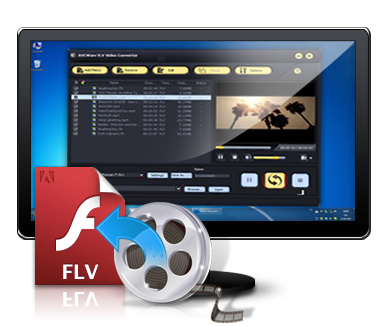
Besides, the FLV converter has the capability of modifying output parameters, trimming video, editing video effects and merging several files into one to suit different needs with a few clicks, which make you get more fun and freedom from FLV file conversion.
Try AVCWare FLV Video Converter for FREE now to get perfect and professional FLV files showing off in your website.!
Key Features
-
Supder Fast Conversion
Intergrated with AVCWare patented FLV encode engine, super fast speed and excellent output quality are ensured. -
All Video Formats Supported
All video formats like AVI, MPEG, WMV, DivX, XviD, MP4, MOV, M4V, ASF, RM, etc are supported. -
Customize output settings freely
Provide more general and professional parameters for either beginner or experienced user. And save the modified parameters as a new profile for quick access again. -
Trim and convert video clip
With AVCWare FLV Video Converter, any video clip can be converted. Just set the start and end point of the clip to remove unwanted parts and convert the needed one. -
Smart video editing tools
Practical video editing tools: cropping video size, modifying frame effect, and adding picture/text watermark help you get your own video with wanted effects. -
Merge
Merge several small files into a large one to watch the output file without any halt. -
Run in background
Support running the FLV converter in the background to save CPU resource and make other programs run smoothly. -
Preview video and extract picture
Preview videos before you convert and take a snapshot if you like some video screen images during preview. -
Convert with multi-core CPU
The FLV converter will automatically detect CPU configuration and multiple tasks will be implemented with multi-core CPU. -
Batch conversion and multithreading
AVCWare FLV Video Converter supports batch conversion and multithreading, so that you can convert couple files at the same time to save conversion time. -
After done action
With one of after done actions: shutdown, hibernate, standby and exit, there is no need for you to wait the long time conversion to the end.
Reference
| Input File Format Supported | |
| Video | AVI, MPEG, WMV, MP4, FLV, MKV, H.264/MPEG-4, DivX, XviD, MOV, RM, RMVB, M4V, VOB, ASF, 3GP, 3G2, H.261, H.264, DV, DIF, MJPG, MJPEG, DVR-MS, NUT, QT, YUV, DAT, MPV, NSV AVCHD Video (*.mts, *.m2ts), H.264/MPEG-4 AVC (*.mp4), MPEG2 HD Video (*.mpg; *.mpeg), MPEG-4 TS HD Video (*.ts), MPEG-2 TS HD Video (*.ts), Quick Time HD Video (*.mov), WMV HD Video (*.xwmv), Audio-Video Interleaved HD Video (*.avi) |
| Audio | MP3, WMA, AAC, WAV, CDA, OGG, FLAC, APE, CUE, M4A, RA, RAM, AC3, MP2, AIFF, AU, MPA, SUN AU Format |
| Image | BMP, GIF, JPEG, PNG |
| Output File Format Supported | |
| Video | AVI, MPEG, WMV, MP4, MPEG-1, MPEG-4, FLV, DivX, XviD, MOV, RMVB, 3GP, 3G2 |
| Image | BMP, GIF, JPEG, PNG |
System Requirements
| OS | Microsoft® Windows XP (SP2 or later), Windows Vista |
| Processor | 1GHz Intel/AMD processor or above |
| RAM |
256MB RAM (512MB or above recommended) |
| Free Hard Disk | 50MB space for installation |
| Graphic Card | Super VGA (800×600) resolution, 16-bit graphics card or higher |
Quick links
Testimonials
"Two weeks ago, I created one personal website. I need to convert all the video clips I took to FLV so I can show off in my web. And I find your tool is the perfect FLV encoder, fast and high quaity. Two thumbs up!" Mike Snider, German
"I bought your FLV video converter last week, now I can convert YouTube video to MP4 video for playback on my iPod and I'm really very satisfied. It's a great choice. Thanks a lot!!!" Robin Mrths, USA