iPhone Ringtone Maker - Make iPhone Ringtone
Price: $19.95
Bookmark and Share

AVCWare iPhone Ringtone Maker

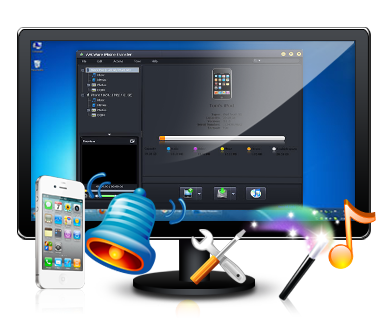
AVCWare iPhone Ringtone Maker, a smart iPhone ringtone creator and uploader, provides an all-in-one iPhone Ringtone solution. With the iPhone ringtone converter, you can create your own M4R iPhone ringtones from all mainstream video/audio formats including AVI, MPEG, WMV, DivX, MP4, H.264/AVC, AVCHD, MKV, RM, MOV, XviD, 3GP, WMA, WAV, RA, M4A, MP3.

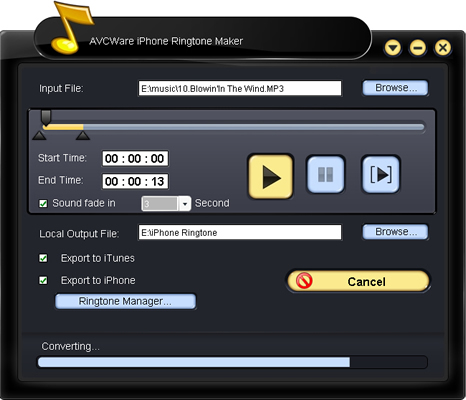
Not only a ringtone maker, this program is but also an ringtone uploader to transfer the converted ringtone to iPhone directly without iTunes after conversion if you want, as well as transfer ringtone to iTunes for backup. Furthermore, AVCWare iPhone Ringtone Maker lets you clip any music segment from any video/audio file, add fade-in effect, and turn it into iPhone ringtone with ease.

Create iPhone ringtone for iPhone, iPhone OS 3.0, iPhone 3G, and iPhone 3GS with AVCWare iPhone Ringtone Maker now, assign a unique iPhone ringtone for every acquaintance, and recognize who is calling effortlessly!

Free Download AVCWare iPhone Ringtone MakerBuy AVCWare iPhone Ringtone Maker

Key Features

    • Convert music file like MP3 to iPhone ringtone (iPhone OS 3.0 and iPhone 3GS supported)

      With the iPhone ringtone converter, any music file you love can be converted to ringtone for iPhone due to the support for a wide range of music formats like MP3, WMA, WAV, M4A, etc.

    • Make iPhone ringtone from video

      Love the music in the movie and want it as ringtone? The iPhone ringtone maker can make it. Any video formats are supported: AVI, MPEG, WMV, DivX, MP4, H.264/AVC, AVCHD, MKV, RM, MOV, XviD, 3GP, etc.
    • Transfer ringtones to iPhone or iTunes directly

      After conversion, AVCWare iPhone Ringtone Maker can add the converted ringtone into your iPhone directly without iTunes, thus you can hear the featured ringtone when your friends call you. Adding converted ringtone to iTunes is supported as well.
    • Customize ringtone duration

      If you just love a clip in a music file, this iPhone ringtone converter helps you set exact start time and end time of the segment you want and turn it into iPhone ringtone.
    • Add fade-in effect

      Add fade-in effect to your iPhone ringtone, customize fade-in time and make iPhone ringtone of your own.
    • Music player for pre-listening

      A built-in music player is available for you to pre-listen source video/audio file before converting.
    • Easy to use iPhone Ringtone Maker

      Making iPhone ringtone from your favored video/music file is so easy: add file and convert!
    • Multi-language iPhone Ringtone Converter

      Support four interface languages: English, German, Japanese and Chinese.

Reference

Output Device Supported
Device iPhone, iPhone 3G, iPhone 3GS, iPhone OS 3.0
Input File Format Supported
Video AVI, MPEG, WMV, MP4, FLV, MKV, H.264/MPEG-4, DivX, XviD, MOV, RM, RMVB, M4V, VOB, ASF, 3GP, 3G2, SWF, H.261, H.264, DV, DIF, MJPG, MJPEG, DVR-MS, NUT, QT, YUV, DAT, MPV, NSV AVCHD Video (*.mts, *.m2ts), H.264/MPEG-4 AVC (*.mp4), MPEG2 HD Video (*.mpg; *.mpeg), MPEG-4 TS HD Video (*.ts), MPEG-2 TS HD Video (*.ts), Quick Time HD Video (*.mov), WMV HD Video (*.xwmv), Audio-Video Interleaved HD Video (*.avi)
Audio MP3, WMA, AAC, WAV, CDA, OGG, FLAC, APE, CUE, M4A, RA, RAM, AC3, MP2, AIFF, AU, MPA, SUN AU Format
Output File Format Supported
Audio M4R

System Requirements

OS Microsoft® Windows XP (SP2 or later), Windows Vista
Processor 1GHz Intel/AMD processor or above
RAM 256MB RAM (512MB or above recommended)
Free Hard Disk 50MB space for installation
Graphic Card Super VGA (800×600) resolution, 16-bit graphics card or higher

Quick links

Guide
Contact us

Screenshots

iPhone Ringtone Maker - Make iPhone Ringtone

Testimonials

"I bought your iPhone ringtone maker last week, now I can change my favorite song as my phone ringtone and I'm really very satisfied. It's a great choice. Many greetings." Gary Myers, USA