AVCWare DVD Audio Extractor
Price: $29.95
Bookmark and Share

AVCWare DVD Audio Extractor

If you love the background music or dialogue in a DVD movie, then AVCWare DVD Audio Extractor is definitely your best choice to listen to the DVD movie music on digital players. This professional DVD audio extracting/ripping software tool can rip and convert DVD to all popular audios such as DVD to MP3, WMA, WAV, M4A, AAC, AC3 and OGG for different digital players with excellent sound quality.

Merging several chapters/titles into one for outputting can get a long file for uninterrupted listening, adjust bit rate, sample rate, channels, etc. to get custom music file. With easy-to-use interface, ultra-fast extracting speed and rich audio formats support, AVCWare DVD Audio Extractor helps you get amazing music from DVD movies to enrich your leisure and scrap times by your players anytime.

Free Download AVCWare DVD Audio ExtractorBuy AVCWare DVD Audio Extractor

Key Features

  • Easy-to-use and friendly interface

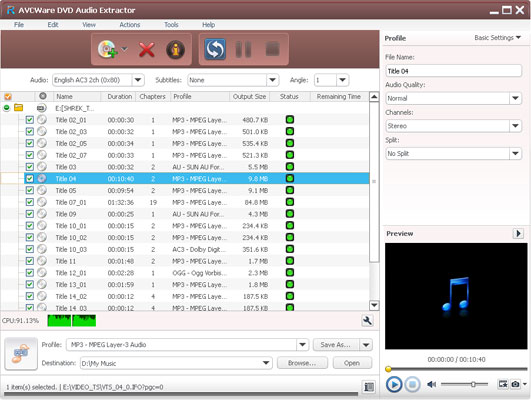
    The easy-to-use and friendly interface in AVCWare DVD Audio Extractor makes that the DVD to audio conversion can be completed in a few clicks.
  • Batch processing

    Select all tracks you want to rip, and the DVD audio extractor will automatically extract them one by one.
  • Ultra-fast extracting speed

    Auto-detect your CPU, offer higher speed and better promotion to accelerate your DVD to MP3, DVD to WMV conversion.
  • Trim file

    Easily set start point an end point to get the very segment you want only for converting.
  • Merge several files into one

    You can optionally merge any chapters/titles into one large file for converting, thus you can enjoy an uninterrupted music file on your player.
  • Output multiple audio files from one DVD audio track

    The DVD audio ripper allows you to add multiple audio formats such as WMA, AAC, WAV, OGG, RA, M4A, AC3, MP2, MP3, etc. to one source, then you just need to click one button to get multiple files converted at one time.
  • Audio preview

    Listen to the selected chapters anytime to ensure the audios to be converted are really what you want to extract.
  • Keep automatically updated

    Check for update automatically to ensure you own the latest features and best experience.
  • Run in background

    Let the DVD audio extractor run in background to save more CPU resource for other running applications.
  • Set after done action

    If you don't want to wait for the conversion to finish, then try to set an after done action before converting: exit program, shut down, hibernate and stand by.
  • Individualize your product appearance

    You can choose interface skin and language to meet your favor.

Reference

Input File Format Support
DVD-Video, DVD folder, DVD IFO file
Output File Format Support
Audio MP3, WMA, AAC, WAV, OGG, RA, M4A, AC3, MP2, SUN AU Format

System Requirements

OS Microsoft® Windows XP (SP2 or later), Windows Vista
Processor 1GHz Intel/AMD processor or above
RAM 256MB RAM (512MB or above recommended)
Free Hard Disk 30MB space for installation
Graphic Card Super VGA (800×600) resolution, 16-bit graphics card or higher
Others DVD-ROM drive

Quick links

FAQs
Guide
Contact us

Screenshots

AVCWare DVD Audio Extractor